Last reviewed
Can MatterFirst configure complex matter workflows?
Configure matter workflows: describe the process, edit visually, check, simulate, review and publish. Use conditional decisions, tasks and dates, approval requirements, document preparation, prepared signing requests and waits. Publishing creates a version; drafts do not silently alter running workflows.
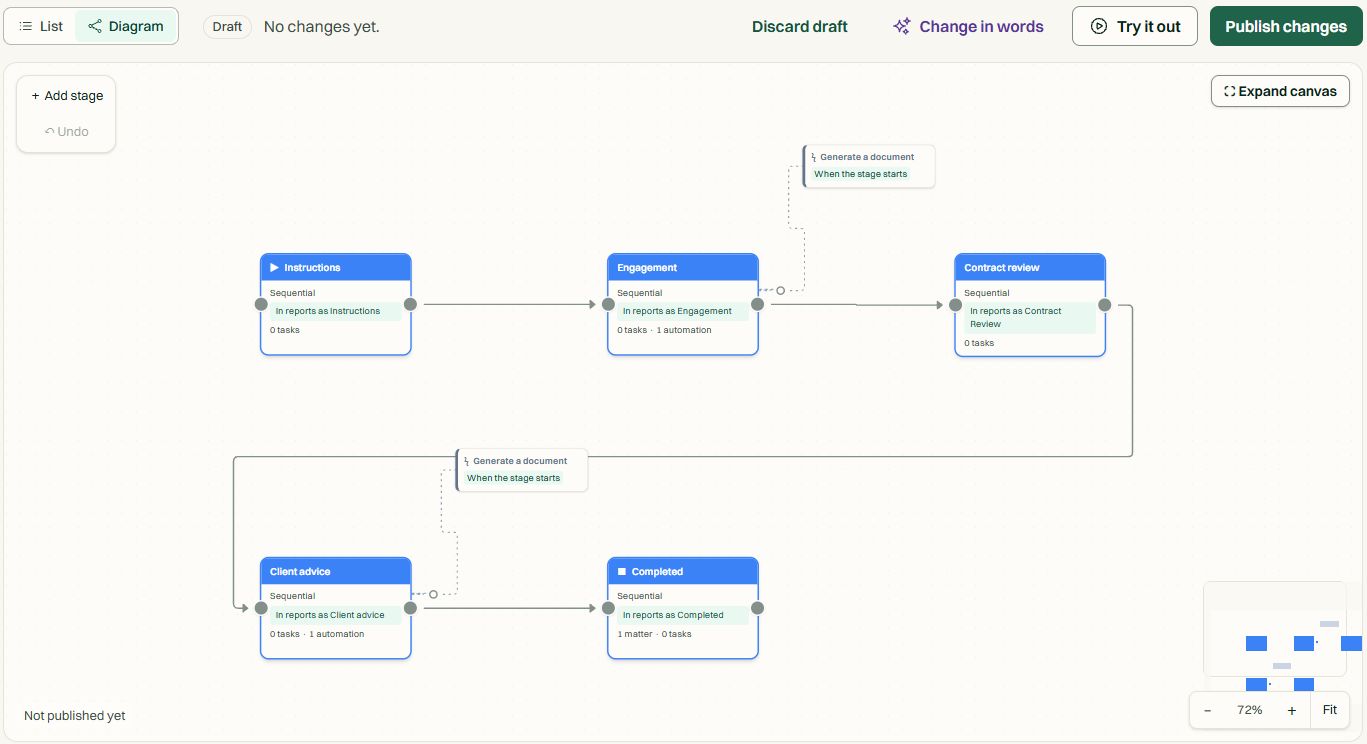
| Stage | What you do | Control |
|---|---|---|
| Describe | Describe the matter process and answer drafting questions | AI proposes a draft for review |
| Edit visually | Connect steps, decisions, tasks, dates, actions and waits | Inspect each branch and action configuration |
| Check | Resolve missing references, permissions and configuration | Checks identify publication blockers |
| Simulate | Try normal paths, missing documents, failures and changed dates | Preview only: no live matter changes or communications |
| Review | Check proposed effects, approval requirements and AI cost bounds | Confirm changes before publishing |
| Publish | Publish a version for use on matters | Draft edits do not silently change running workflows |
Solo includes 5 workflows; Practice and above include unlimited workflows. Workflows and automations are separate: automations are unlimited on these plans. AI-assisted drafting and AI steps use the plan's AI allowance, with additional usage charged separately.
Why MatterFirst
What you get when you switch.
Build the process your team actually follows
- Conditional decisions. Different matter information follows different branches. Configure the conditions visually.
- Tasks and dates. Assign work and date rules to steps. Check supported rules and jurisdiction inputs before relying on computed deadlines.
- Document preparation and signing. Prepare documents from matter information, then send prepared signature requests. Check the document, recipients and fields before sending.
- Approval requirements and waits. Hold progression for a named approval, required document, task completion, signature or payment.
Decisions, preparation and approvals on one canvas.
Preview effects before making them live
- Check the draft. Resolve invalid references, automatic cycles, missing permissions and action configuration.
- Simulate the paths. Simulation previews proposed actions without sending communications, calling providers or changing live matters. Review and approve proposed changes before publishing. Prepare documents, recipients and signature fields before a workflow sends a signing request.
- Review AI steps. Set approval requirements and cost bounds. AI work consumes the plan’s allowance; additional usage charges apply.
- Publish a version. Publishing creates a retained version. Existing matters keep their version unless explicitly migrated.
Simulation, review and versioned publication.
What this actually does
Simulation previews proposed actions without sending communications, calling providers or changing live matters. Review and approve proposed changes before publishing. Prepare documents, recipients and signature fields before a workflow sends a signing request.
Evaluate the same branching process, approval requirement and failure scenario in a guided trial. Inspect the synthetic workflow walkthrough at /product-walkthroughs.
14 days
guided trial shaped around how your firm works
1 connected workspace
Microsoft 365, Google Workspace, Xero and Stripe, connected by you
34 dated claims
about security and data on the trust page, each with its evidence, including what is not done yet
MatterFirst is an AI-native legal practice management platform for Australian law firms, built for small and boutique practices by NorthCape Technology.
For small Australian firms with repeatable or branching processes, practitioner approvals and matter-specific documents. Evaluate your actual process, required actions and supported date rules in simulation before publication.
FAQ
Frequently asked questions
Can I configure my firm's workflows?
Does simulation change live matters?
Does editing a draft change running workflows?
What are the plan limits?
Where is my data stored?
How much does MatterFirst cost?
Can I get my data out if I leave?
Is there a free trial?
Who builds MatterFirst?
Is MatterFirst suitable for a firm of my size?
Bring your process to the canvas.
Book a demo to describe, edit, check and simulate your own workflow before publishing.
We can't find the internet Attempting to reconnect
Something went wrong! Attempting to reconnect