Intake forms
Ask once, capture everything.
Every submission becomes a lead.
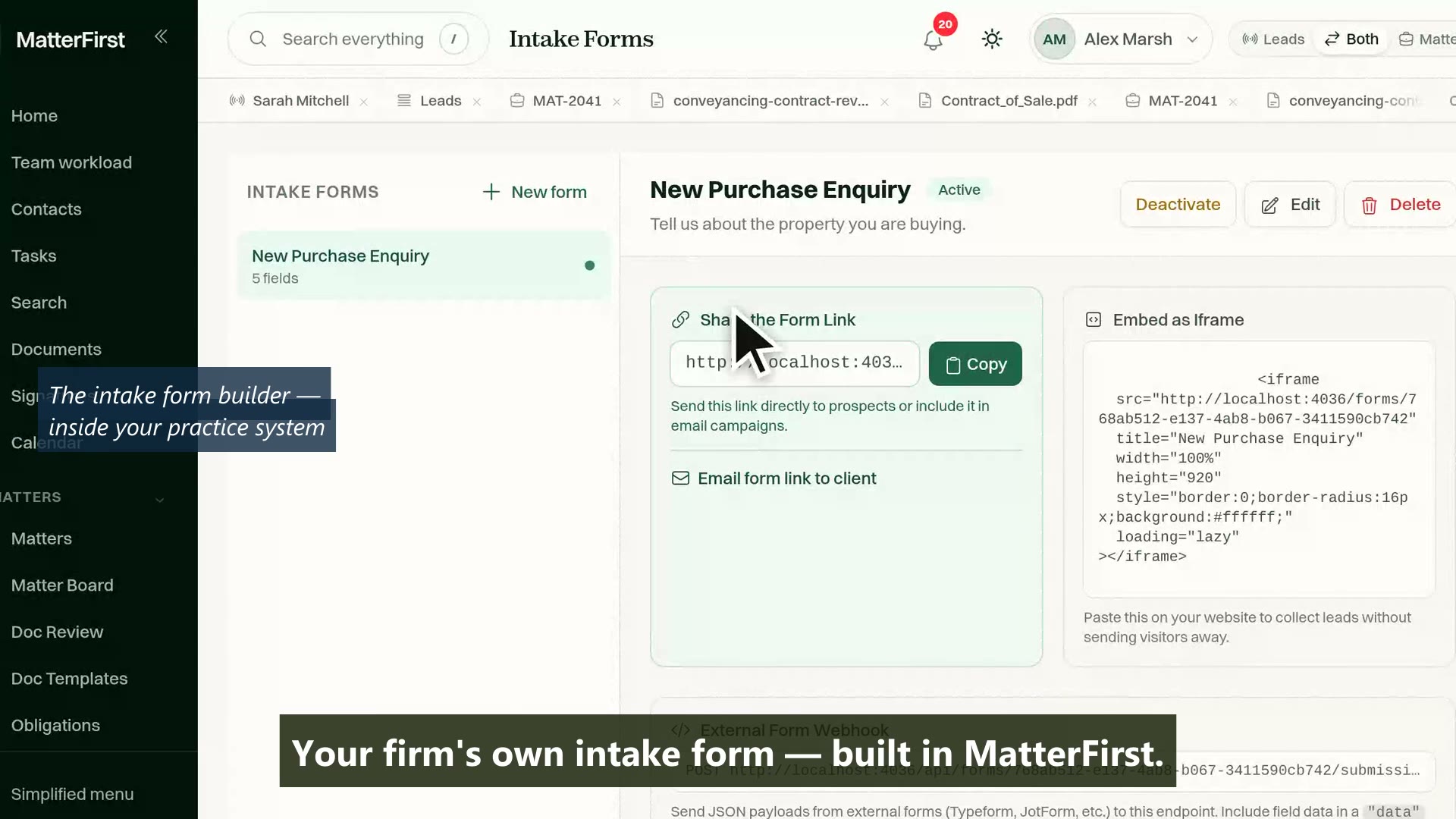
Build a form from typed fields, share it as a link or embed it on your site, and every submission creates a lead with the answers already where they belong: no client login, no retyping, no inbox triage.
Last reviewed
What is a legal client intake form?
A form your firm builds from typed fields and shares by link, embed or email, with no client login. In MatterFirst each submission creates a lead automatically: mapped answers fill lead and contact fields, unmapped answers are kept in notes, and the lead lands in the pipeline the form names, owned and on an SLA clock.
How it works
From form to routed lead
Form opened
Answers captured
Mapped to fields
Lead created
Routed and live
No client login: the link is the credential
Unmapped answers are kept in lead notes, not dropped
The portal and the AI assistant feed the same intake path
Form builder
Typed fields, built in minutes
Build each form from real field types rather than free text, optionally tied to a matter type. Full name and email are on every form so a submission is always someone you can actually reply to.
- Eight field types: short and long text, email, phone, number, date, dropdown and checkbox
- Full name and email on every form, required, and the builder will not let you remove them
- Per-field required flags, help text and dropdown options, with drag to reorder
- A dropdown with no options cannot be saved, so a form nobody could complete never goes live
Capability 1 of 4
Build it once, share it anywhere.
Field mappings
Answers land in fields, not in a heap
Each field maps to a lead or contact attribute, so a submission arrives as structured data and creates the lead's contact as it goes. Whatever you choose not to map is kept, not dropped.
- Map answers to lead fields: name, summary, notes, source detail, referral source or custom metadata
- Map contact details: first and last name, email, phone, mobile, company and address
- Unmapped answers go to the lead's notes by default, with metadata or discard as the alternatives
- Mappings follow the field itself, so renaming a field does not silently orphan its mapping
Capability 2 of 4
Every answer lands somewhere deliberate.
Routing
Submitted, created, routed. No triage inbox.
Every submission becomes a lead through one intake path, the same one the client portal and the AI assistant's intake use. The form and your firm's intake defaults decide where it goes before anyone has looked at it.
- The form names the pipeline its leads land in
- Your default intake assignee takes ownership, and a matter type can name its own
- Priority sets an SLA due date from the hours your firm configures
- A "When a form is submitted" trigger starts your automation rules the moment the answers arrive
Capability 3 of 4
Every enquiry arrives already routed.
Sharing
On your website, in an email, in the portal
Each form has a public URL that works without any client account, carries your firm's branding, and sits behind spam throttling. Share it wherever the enquiry actually starts.
- A shareable public link that needs no client login
- An iframe embed for your firm's own website
- Email the form link to a client from inside MatterFirst
- Offer a form inside the client portal only when you tick it, per form
Capability 4 of 4
Your form, on your site, under your name.
MatterFirst is an AI-native legal practice management platform for Australian law firms, focused on small and boutique firms from solo practitioners up to about 20 users, built by NorthCape Technology, covering matters, AI document work, configurable workflows, automatic time capture for review, Matti, built-in signing, trust accounting, billing and a client portal, with firm and matter visibility of MatterFirst AI usage charges.
This suits firms whose enquiries start on the web and end up retyped: out of an email inbox, a PDF or a generic form builder and into the practice system. It is built for capture and routing rather than long interviews: fields are flat, with no conditional branching, so it will frustrate a firm that wants a questionnaire that changes shape as the client answers.
FAQ
Frequently asked questions
Do clients need an account to fill in a form?
What happens to answers that are not mapped to a field?
Who does the lead go to?
What stops spam through a public form?
Where is my data stored?
How much does MatterFirst cost?
Can I get my data out if I leave?
Is there a free trial?
Who builds MatterFirst?
Is MatterFirst suitable for a firm of my size?
Reviewed by Nick Hallam
Co-founder and Operations Director, NorthCape Technology
Aerospace engineer with a background in mission-critical software and complex systems integration, and the one who talks to firms about how they actually run. Keeps MatterFirst grounded in how firms operate, and reviews the practice-area and workflow pages on this site.
Last reviewed
Ready to put a form where your enquiries start?
Book a demo and we will build an intake form for one of your matter types, map its fields, and follow a test submission through to the routed lead.
We can't find the internet Attempting to reconnect
Something went wrong! Attempting to reconnect