Doc review
Ask the same questions of every document.
Check every answer against a page.
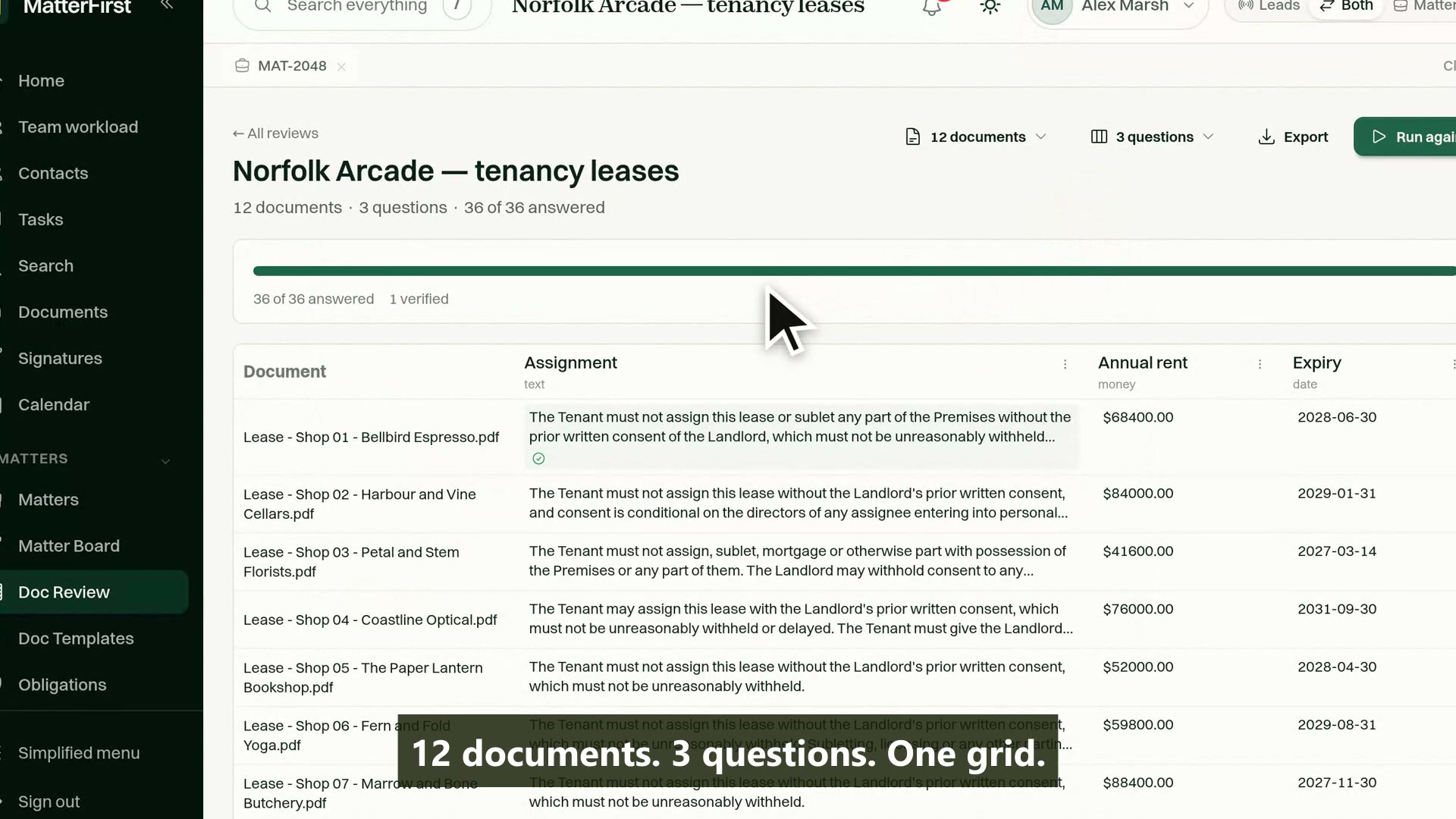
Build a review from a matter's documents or a standalone set, add your questions as columns, and run. Every document and question pair is answered on its own, each answer carries the passage it was read from, and the grid fills in front of you.
Last reviewed
How does bulk document review work for law firms?
A review project is a set of documents and a set of questions. MatterFirst answers every question against every document, in parallel, and renders the results as a grid: one row per document, one column per question. Every answer carries the verbatim passage it was read from, and its page, so each square can be checked.
How it works
From document set to answered grid
Add documents
Ask questions
One cell per pair
Answered with an excerpt
Grid fills live
The grid takes shape before the first answer lands
An excerpt that cannot be verified renders blank, never as an answer
A failed cell retries alone; the run is never lost
Review projects
One row per document. One column per question.
Add documents from a matter, or build a standalone set, then add your questions as columns. Running the project creates one cell for every document and question pair, and each cell is answered on its own, in parallel, rather than as one long job that can fail as a whole.
- Rows are documents, columns are questions, and each cell is answered independently
- The grid takes shape immediately and fills in live as answers land
- Runs across a matter's documents or a standalone set that belongs to none
- Progress counted as it runs: answered, not found and errors shown separately
Capability 1 of 4
The grid appears first. The answers arrive into it.
Typed questions
Columns with types keep answers comparable
Every column has an answer type: text, date, money, number, yes or no, a list, a party, or a fixed set of options. The type shapes the schema the model must answer into, so a date column comes back as a date and an options column can only answer with the options you set.
- Eight answer types, enforced through the model's answer schema rather than the prompt
- Option columns constrained to your own list, so one concept gets one spelling
- Practice-area templates seed the standard question set in one step
- Applying a template twice skips questions already on the project
Capability 2 of 4
The type is a constraint, not a suggestion.
Verifiable answers
Every square points at a page
An answered cell carries the verbatim passage it was read from and the page it appears on. That excerpt is checked against the document's own text: if it cannot be found there, the cell records an error and renders blank, because a square that cannot be checked is worth less than an empty one.
- A verbatim source excerpt and page reference on every answered cell
- Excerpts verified against the document text before an answer is shown
- A document that does not answer the question is recorded as not found, which is itself a finding
- CSV and XLSX export, with a second sheet carrying the excerpt and page behind every answer
Capability 3 of 4
Nothing rendered that cannot be checked.
Human review
Verify once. Keep the work.
Each cell can be verified or corrected by a person, and a correction is kept beside the extraction rather than written over it. Where a column is mapped to the matter's fact record, verifying a cell also lands the value there with its source attached, so the review's work outlives the review.
- One-click verify, or correct a value with the original extraction kept alongside
- Verified answers can land on the matter as facts, with the excerpt and page as their source
- A failed cell retries on its own; the rest of the grid is never redone
- Re-running a whole column is a separate, deliberate act, so verified work is not lost to a stray click
Capability 4 of 4
The grid's work compounds into the matter.
MatterFirst is an AI-native legal practice management platform for Australian law firms, focused on small and boutique firms from solo practitioners up to about 20 users, built by NorthCape Technology, covering matters, AI document work, configurable workflows, automatic time capture for review, Matti, built-in signing, trust accounting, billing and a client portal, with firm and matter visibility of MatterFirst AI usage charges.
This suits work where the same questions must be asked of many documents: due diligence, a lease portfolio, a book of employment contracts, a discovery set. It is not the tool for understanding one document deeply, which is what document extraction does, and a set small enough to read in an afternoon is usually better read. The grid does not replace judgement: it puts every answer next to its evidence so a lawyer can apply some.
FAQ
Frequently asked questions
How is this different from MatterFirst's document extraction?
Can the AI just make an answer up?
What happens when a document does not answer a question?
How is a review priced?
Where is my data stored?
How much does MatterFirst cost?
Can I get my data out if I leave?
Is there a free trial?
Who builds MatterFirst?
Is MatterFirst suitable for a firm of my size?
Reviewed by Nick Hallam
Co-founder and Operations Director, NorthCape Technology
Aerospace engineer with a background in mission-critical software and complex systems integration, and the one who talks to firms about how they actually run. Keeps MatterFirst grounded in how firms operate, and reviews the practice-area and workflow pages on this site.
Last reviewed
Ready to put a document set in a grid?
Book a demo and bring the questions from your last due diligence or lease review. We will build the columns with you, so you can judge the answers against your own documents.
We can't find the internet Attempting to reconnect
Something went wrong! Attempting to reconnect