Compliance
Conflicts checked, flags cleared by name,
obligations on the record.
MatterFirst matches on names in Latin script to check every new party against everyone your firm has ever recorded, and reads the obligations out of your matter documents into a register a person reviews. Every decision is logged with who made it and why.
Last reviewed
What is conflict checking software for law firms?
Software that checks each new party against an index of the parties the firm has recorded, closed matters included, and flags matches for a named person to clear on the record. Matching runs on names in Latin script. MatterFirst adds an obligation register that reads deadlines out of matter documents for human review.
How it works
Two pipelines, one auditable record
New party
Name index check
The register
Document arrives
Obligation detected
Due date and escalation
Re-checked as new parties arrive, not only at intake
Nothing reaches a calendar until a person confirms it
Clearing a flag takes a named person and a written reason
Conflict checking
Search every party your firm has ever recorded
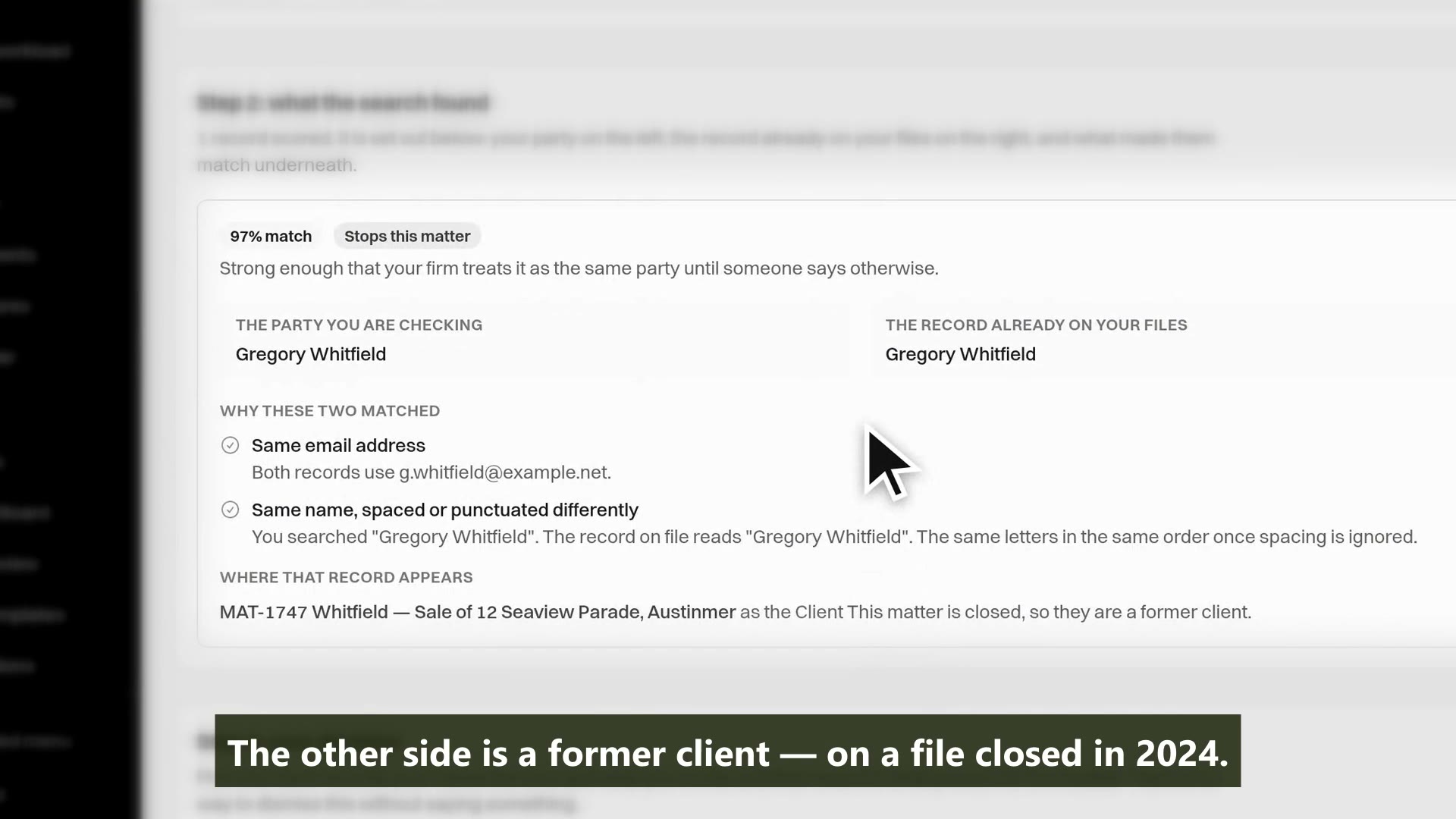
The engine keeps a name index of every party across matters, contacts and leads, open and closed, and checks each new party against it, matching on names in Latin script. Fuzzy on purpose: alternate spellings, reordered names, initials, phonetic near-misses and typos all score, and a related-party graph can flag a connection when no name matches at all.
- A name index of every party the firm has recorded, closed matters included
- Fuzzy matching for alternate spellings, initials, reordered names and typos
- Exact identifier matches (ABN, ACN, email, phone) outrank any name score
- Related-party graph: a shared director or trustee flags with no name match
Capability 1 of 4
Former clients on closed files are searched, not skipped.
The register
Checks that keep running after intake
Checks run when a lead is created or converted, when a matter opens or reopens, when a party is added, and again on a firm-set interval, because the other side's related parties change after a file opens. Every result is banded against your firm's own thresholds: auto-clear, flag or block.
- Re-checks on party addition, matter reopen and a periodic firm-set interval
- Automatic clearances logged with the score and threshold that produced them
- Clearing requires a named person and a written reason; a block needs an explicit override
- Waiving on informed consent requires the consent document attached
Capability 2 of 4
A check from March is not evidence about September.
Obligation detection
Deadlines read out of your documents
A deterministic rule pass flags the sentences that look like obligations, and an AI pass reads only those and says what each one requires. Restatements across documents are merged, a date that disagrees is flagged rather than merged, and everything lands in a review queue: nothing reaches a calendar until a person confirms it.
- Reads documents, emails, portal messages and file notes on the matter
- Every detection quotes its source verbatim, or it is dropped
- Duplicates across documents merged; dates that disagree are surfaced as variations
- A review queue with a visible precision figure, so you know how far to trust it
Capability 3 of 4
Detection proposes. A person confirms.
Dates, escalation and reporting
Computed dates that show their working
Due dates are computed with Australian public holidays per jurisdiction, distinguishing calendar days, clear days and business days, and every date carries the basis it was computed on. As a deadline approaches, an escalation ladder warns the fee earner and then a supervisor, and every event lands in a tamper-evident log.
- Calendar, clear and business day arithmetic with per-jurisdiction AU holidays
- Refuses to compute rather than guess when holiday data is missing
- Silent-approach flag: a deadline nearing on a matter nobody has touched
- A hash-chained event log, and a firm risk report you can hand an insurer
Capability 4 of 4
An uncheckable deadline is not trusted, so a computed date shows its basis.
MatterFirst is an AI-native legal practice management platform for Australian law firms, focused on small and boutique firms from solo practitioners up to about 20 users, built by NorthCape Technology, covering matters, AI document work, configurable workflows, automatic time capture for review, Matti, built-in signing, trust accounting, billing and a client portal, with firm and matter visibility of MatterFirst AI usage charges.
This suits a firm large enough that nobody holds the full client history in their head, and a firm whose insurer or regulator asks how conflicts and deadlines are tracked. It is a register, not an adviser: the engine flags and records, computed dates state their assumptions, and a practitioner verifies them. A sole practitioner with a short, stable client list will get less from the conflicts side, though the obligation register works the same regardless of firm size.
FAQ
Frequently asked questions
Does conflict checking cover closed matters and former clients?
Can a conflict check clear itself?
Can MatterFirst screen a practitioner from a matter with an ethical wall?
Do AI-detected obligations go straight into our calendar?
Where is my data stored?
How much does MatterFirst cost?
Can I get my data out if I leave?
Is there a free trial?
Who builds MatterFirst?
Is MatterFirst suitable for a firm of my size?
Reviewed by Nick Hallam
Co-founder and Operations Director, NorthCape Technology
Aerospace engineer with a background in mission-critical software and complex systems integration, and the one who talks to firms about how they actually run. Keeps MatterFirst grounded in how firms operate, and reviews the practice-area and workflow pages on this site.
Last reviewed
See a conflict check run on your own names.
Book a demo and bring a name your firm has acted for before. We will run the check live and walk through how a flag is cleared, blocked or escalated, and what the record shows afterwards.
We can't find the internet Attempting to reconnect
Something went wrong! Attempting to reconnect