Client onboarding
Everything you need from a new client,
collected before work begins.
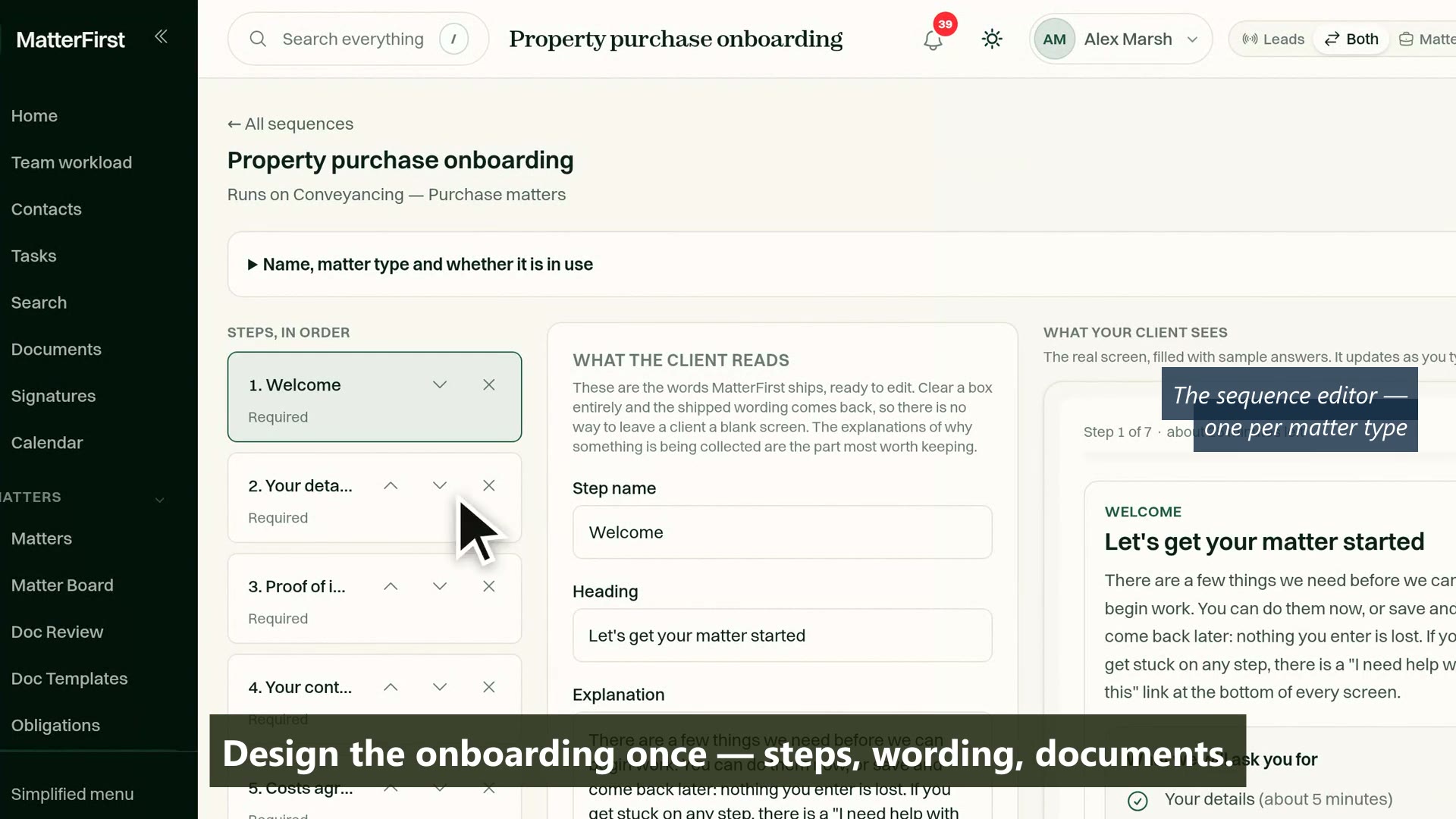
When a matter opens, send the client a sequence: confirm their details, photograph their ID, upload documents, sign the costs agreement and put funds into trust. They do it from a link on their phone, and everything they enter lands on the matter rather than in your inbox.
Last reviewed
What is client onboarding software for a law firm?
A guided sequence a firm sends a new client when a matter opens: confirm details, prove identity, upload documents, sign the costs agreement and put funds into trust, from a link on their phone. In MatterFirst every answer is written onto the matter, and finishing creates the client's portal account.
How it works
From matter opened to matter ready
Matter opened
Link sent
Forms, ID and documents
Costs agreement signed
Matter and portal ready
No login needed to start
Stalled clients are reminded automatically
The sequence
Configurable steps, set once per matter type
A sequence is a list of steps: confirm details, proof of identity, document uploads, your own questions, the costs agreement, a trust deposit. Edit the steps, the order and the wording for each matter type, and every new matter of that type sends the right sequence.
- A step catalogue covering details, identity, documents, questions, signature and payment
- Sequences per matter type, with an organisation-wide fallback
- A coverage view showing which matter types would send which sequence
- Conditional steps, evaluated by the same condition engine as automations: a company client can be asked different questions from an individual
Capability 1 of 4
The right steps for the matter type, every time.
The client experience
A link on their phone, one thing per screen
The client opens an emailed link and works through the sequence one screen at a time, with an honest estimate of the time left. No account, no password, no app. Steps shared between parties are asked once: the second purchaser sees who has already provided a document, not the same request twice.
- No login to start: the link is the credential, it rotates on every completed step, and only a hash of it is ever stored
- Built for a phone: one action per screen, large touch targets, and a typed alternative to every drawn signature
- Time estimates calculated from the steps actually left, not a guess
- An "I need help with this" link on every screen, which flags the client to your staff
Capability 2 of 4
Designed for a client on a phone, not a lawyer at a desk.
Written back
Every answer lands somewhere real
Onboarding that ends in a PDF is retyping deferred. When a client finishes, everything they entered is written in one transaction: the signed agreement, the deposit, their confirmed details and every question you pointed at a field. If any of it cannot be written, nothing half-lands, and a task tells the firm why.
- Point any question at a custom matter field, a key date, the contact record or the matter's notes
- Confirmed details recorded as matter facts, marked as entered by the client
- A confirmed deposit receipted into your trust account, with its receipt number on the record
- Completion creates the client's portal account, so they keep a portal after onboarding ends
Capability 3 of 4
One transaction: agreement, deposit, details, answers.
The firm's side
See who is stuck, before they give up
A register shows every onboarding in flight: the stage each client has reached, how long they have been waiting, who has asked for help and who has a blocker. Reminders run themselves, and the analytics tell you which step to fix rather than leaving you to guess.
- Every onboarding in flight, most urgent first, with stage, waiting time and blockers
- Escalating reminders, capped, and measured from the client's last action: progress is never punished with a nudge
- Each reminder carries a fresh link, so the newest email always opens
- Completion rate and per-step drop-off analytics, separating what clients finished themselves from what staff finished for them
Capability 4 of 4
Progress per client, reminders on autopilot.
MatterFirst is an AI-native legal practice management platform for Australian law firms, focused on small and boutique firms from solo practitioners up to about 20 users, built by NorthCape Technology, covering matters, AI document work, configurable workflows, automatic time capture for review, Matti, built-in signing, trust accounting, billing and a client portal, with firm and matter visibility of MatterFirst AI usage charges.
This suits firms that open matters for new individual clients week in, week out: conveyancing, family, wills and estates, where identity has to be verified and a costs agreement signed on every new file. A firm acting mostly for a handful of longstanding corporate clients will use it rarely, and a client who will not do this digitally still needs the phone and the front desk: the flow offers them a way out, not a wall.
FAQ
Frequently asked questions
Can we change what a sequence asks?
What happens when a client stalls?
Where do the client's answers end up?
How is proof of identity handled?
Where is my data stored?
How much does MatterFirst cost?
Can I get my data out if I leave?
Is there a free trial?
Who builds MatterFirst?
Is MatterFirst suitable for a firm of my size?
Reviewed by Nick Hallam
Co-founder and Operations Director, NorthCape Technology
Aerospace engineer with a background in mission-critical software and complex systems integration, and the one who talks to firms about how they actually run. Keeps MatterFirst grounded in how firms operate, and reviews the practice-area and workflow pages on this site.
Last reviewed
Ready to stop chasing new clients for paperwork?
Book a demo and we will send you the client's side of an onboarding sequence, so you see exactly what your clients would see, on your own phone.
We can't find the internet Attempting to reconnect
Something went wrong! Attempting to reconnect