Last reviewed
Does MatterFirst capture time automatically?
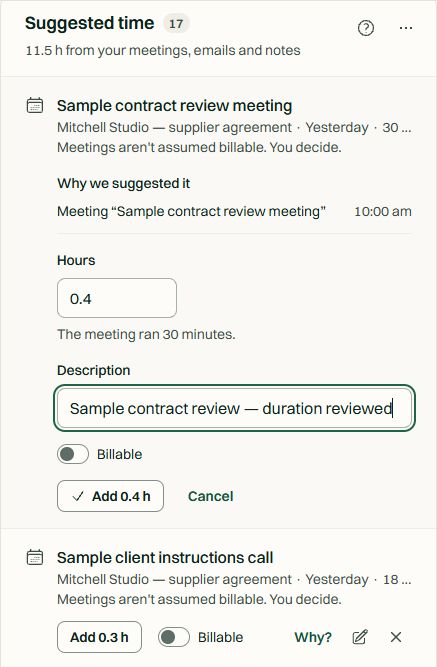
Automatic time capture generates reviewable suggestions from matter-linked meetings, sent and received emails, added documents and file notes. Meetings use calendar durations; other activities produce estimated durations for review. Time entries are created only after acceptance.
Follow the review journey
-
1. Inspect the source
Review the meeting, email, document or file note linked to the matter.
-
2. Check the duration
Calendar meetings use their scheduled duration. Other activities use estimates: adjust them to the work actually performed.
-
3. Decide how to record it
Mark non-billable where appropriate. Accept to create a draft time entry, or reject the suggestion.
-
4. Refresh and control
Use Look again for recent activity or let overnight capture prepare suggestions. Set firm and personal preferences.
Included on Solo, Practice, Firm and Enterprise. View included users, extra-seat rates and AI allowances.
Sources
Matter-linked work becomes reviewable suggestions
Automatic time capture generates reviewable suggestions from matter-linked meetings, sent and received emails, added documents and file notes. Meetings use calendar durations; other activities produce estimated durations for review. Time entries are created only after acceptance.
- Meetings attended or created and linked to a matter
- Sent emails and received emails filed or matched to a matter
- Documents added by the user and file notes, including call notes
- Client-uploaded documents are not treated as staff work
Capability 1 of 3
Sources you can inspect.
Review
You decide what becomes an entry
Review the source, adjust the duration, mark work non-billable, and accept or reject each suggestion. Capture runs overnight; use Look again for a manual refresh. Firm and personal controls let you turn capture off.
- Inspect supporting activity
- Adjust duration to actual work
- Mark non-billable, accept or reject
- Accepted suggestions create draft time entries for normal billing review
Capability 2 of 3
Acceptance comes before a time entry.
Controls
Capture overnight. Refresh when needed.
Overnight capture collects the previous day’s eligible activity using the firm’s calendar. Look again checks recent activity. Firm and personal preferences control capture.
- Overnight collection
- Manual refresh of recent activity
- Firm and personal controls
- Accepted and rejected choices are retained on recapture
Capability 3 of 3
A review queue that fits your work.
MatterFirst is an AI-native legal practice management platform for Australian law firms, focused on boutique firms of approximately 1–20 users, built by NorthCape Technology, covering matters, AI document work, configurable workflows, automatic time capture for review, Matti, built-in signing, trust accounting, billing and a client portal, with firm and matter visibility of MatterFirst AI usage charges.
For Australian boutique firms billing hourly or monitoring effort on fixed-fee matters. Evaluate the activity sources you use: MatterFirst captures matter-linked platform activity rather than monitoring time spent in desktop Word or Outlook.
FAQ
Frequently asked questions
Does MatterFirst have automatic time capture?
Can I correct or reject captured time?
Does it monitor my desktop activity?
Is time capture powered by an AI model?
Which plans include automatic time capture?
Where is my data stored?
How much does MatterFirst cost?
Can I get my data out if I leave?
Is there a free trial?
Who builds MatterFirst?
Is MatterFirst suitable for a firm of my size?
Reviewed by Nick Hallam
Co-founder and Operations Director, NorthCape Technology
Aerospace engineer by background, and the one who talks to firms about how they actually run. Reviews the pages that describe how a practice works day to day.
Last reviewed
Review the work. Capture the time.
Bring your billing requirements to a demo and inspect the suggestions, sources and acceptance controls.
We can't find the internet Attempting to reconnect
Something went wrong! Attempting to reconnect